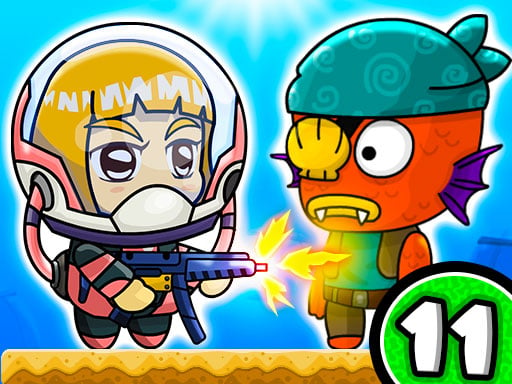
Zombie Mission 11 is a free online co-op zombie platformer you can play in your browser on KoiArcade, with no download and no sign-up. Pirate zombies are attacking the beach and capturing the mermaids; team up with a friend on one keyboard to fight them (Player 1: W A S D + C/V, Player 2: arrow keys + L/K). Works on computers and Chromebooks (best on desktop).
About Zombie Mission 11
Zombie Mission 11 is a free action game you can play right in your browser. It is tagged zombie and platform. It plays in a landscape window and is controlled with keyboard. There is a mode for two players on the same device. It is designed mainly for computers; on a phone, turn it sideways and try fullscreen.
Zombie Mission 11 was added to KoiArcade on 2026-10-25 and is one of 17 free action games you can play online here. If you like it, Crumple Rumble and Bow or Die are similar.
Game description (written by KoiArcade)
Zombie Mission 11 is a 2 player co-op platformer from the Zombie Mission series. This time the zombies have reached the sea: pirate zombies are attacking the beach and capturing the mermaids, and sea creatures have turned into zombies too. Two heroes in diving helmets fight through the levels together on one keyboard, using melee hits, guns, grenades, wall jumps and a special attack that charges up on the SP bar.
The game's own description says the 11th part adds new mechanics, new characters and vehicles.
How to play
- 2 players share one keyboard.
- Player 1: move with W A S D, hit or shoot with C (hold C and release for a mega hit), grenade with V, jump with W, switch weapon with Q and E, special attack with Q + E when the SP bar is full.
- Player 2: move with the arrow keys, hit or shoot with L, grenade with K, jump with Up, switch weapon with O and P, special attack with O + P when the SP bar is full.
- Press jump while sliding down a wall to wall-jump.
Tips
- Keep moving and fight at the edge of a group instead of the middle.
- Reload during quiet moments rather than mid-fight.
- Pause for a second before a tricky section and watch the hazard pattern first.
Game info
| Category | Action |
|---|---|
| Tags | 2 Player, Zombie, Action, Platform, Shooting |
| Controls | Keyboard |
| Players | 1–2 (same device) · more 2 player games |
| Screen | Landscape (800×600) |
| Mobile | Best on desktop |
| Made by | Third-party developer, distributed by GameMonetize |
| Added | 2026-10-25 |
| Age guidance | Content note. Contains fighting, combat or shooting, based on the game's description and tags. Parents of young children may want to try it first. How we judge this |
FAQ
How do you play Zombie Mission 11 with 2 players?
Both players share one keyboard. Player 1 moves with W A S D, hits or shoots with C, throws grenades with V and switches weapons with Q and E. Player 2 moves with the arrow keys, hits or shoots with L, throws grenades with K and switches weapons with O and P.
How do you do the special attack in Zombie Mission 11?
Wait until your SP bar is full, then press both weapon-switch keys together: Q + E for Player 1, O + P for Player 2.
Who made Zombie Mission 11?
RHM Interactive, the studio behind the Zombie Mission series (the game shows TwoPlayerGames.org branding). It came out in 2022.
How do you play Zombie Mission 11?
2 players share one keyboard. Player 1: move with W A S D, hit or shoot with C (hold C and release for a mega hit), grenade with V, jump with W, switch weapon with Q and E, special attack with Q + E when the SP bar is full. Player 2: move with the arrow keys, hit or shoot with L, grenade with K, jump with Up, switch weapon with O and P, special attack with O + P when the SP bar is full. Input: Keyboard.
Does Zombie Mission 11 work on mobile?
It is built mainly for desktop (keyboard). It may run on a tablet, but a computer gives the best experience.
Can two people play Zombie Mission 11?
Yes, it has a two-player mode on the same device. Two players fight the zombies together on one keyboard. P1: W A S D, C shoot, V grenade · P2: arrow keys, L shoot, K grenade. See all 2 player games.
Is Zombie Mission 11 free to play online?
Yes. Zombie Mission 11 is free to play online at KoiArcade. You don't need to pay, create an account or sign in; the game itself may show short ads.
Do I need to download Zombie Mission 11?
No. Zombie Mission 11 is an HTML5 game that runs in your web browser (Chrome, Edge, Safari or Firefox). Open the page and press Play; nothing is installed on your device.
Can I play Zombie Mission 11 on a Chromebook?
Yes. Zombie Mission 11 runs in Chrome, so it works on a Chromebook with its keyboard and trackpad. It is designed for computers, so a Chromebook is a good fit.
Is Zombie Mission 11 unblocked?
KoiArcade is an ordinary game website, not a way around school or work filters. Zombie Mission 11 loads from a normal web page, so it works on any network that allows this site and the game's host; on a filtered network, follow that network's rules.
What games are like Zombie Mission 11?
If you enjoy Zombie Mission 11, try Crumple Rumble, Bow or Die, Super Chop: Forest Hero. You'll find more in our Action games.


